Adjustments
Stock Adjustments
You may from time to time need to manually adjust the stock levels, reasons for this could be stock theft, damaged or used in store. To perform this task while maintaining an effective audit trail we use stock adjustments.
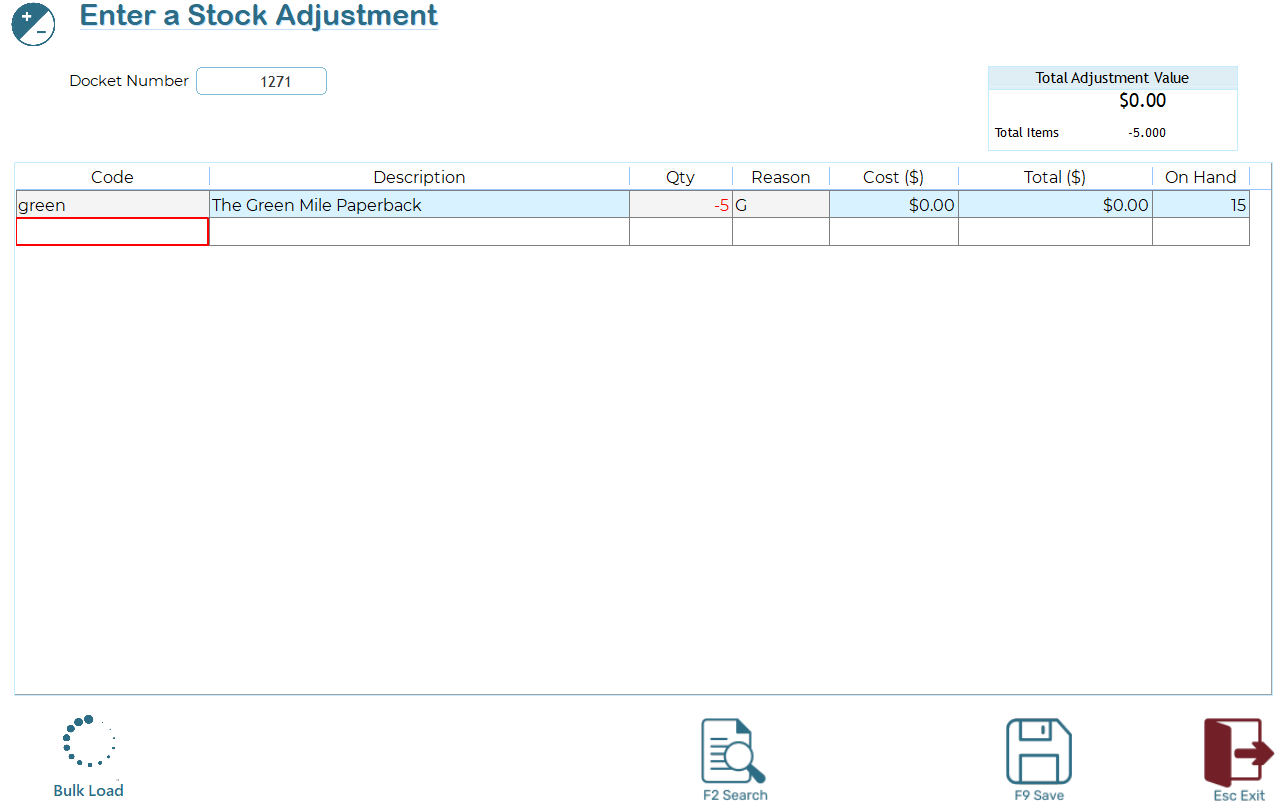
Entering stock manually
In the Stock Code field, enter or search for the item you wish to adjust.
To search, type any part of the ISC, barcode, description, or manufacturer code. The system will return a list of all matching items.
Select the required item and enter the adjustment quantity.
Enter the quantity only; do not use negative values.
When prompted, select the reason for the adjustment.
Adjustment reasons are company-defined and can be maintained, modified, or extended as required.
Based on the selected reason, the system will automatically determine whether the entered quantity increases or decreases the inventory level.
This ensures consistent and controlled stock adjustments across the system.
Bulk Load
You may bulk load adjustments from 2 sources

- Text File: Import a text file from another system. This Function will import a simple CSV file containing ISC and Qty, ie
100042,12
10344,2
35042,16
- Stock Rcpt: Use this option to rollback a Stock Receipt processed in error. You will be prompted for the Stock Receipt docket number. Once entered, the items will be preloaded for you. Simply press "Save" to reverse the receipt.