Stock Status
Stock Status Report
The Stock Status Report provides a powerful and flexible way to analyse your inventory based on stock status, movement, value, and classification. It is designed to help identify slow-moving items, off-range stock, valuation issues, and supplier or attribute-based groupings.
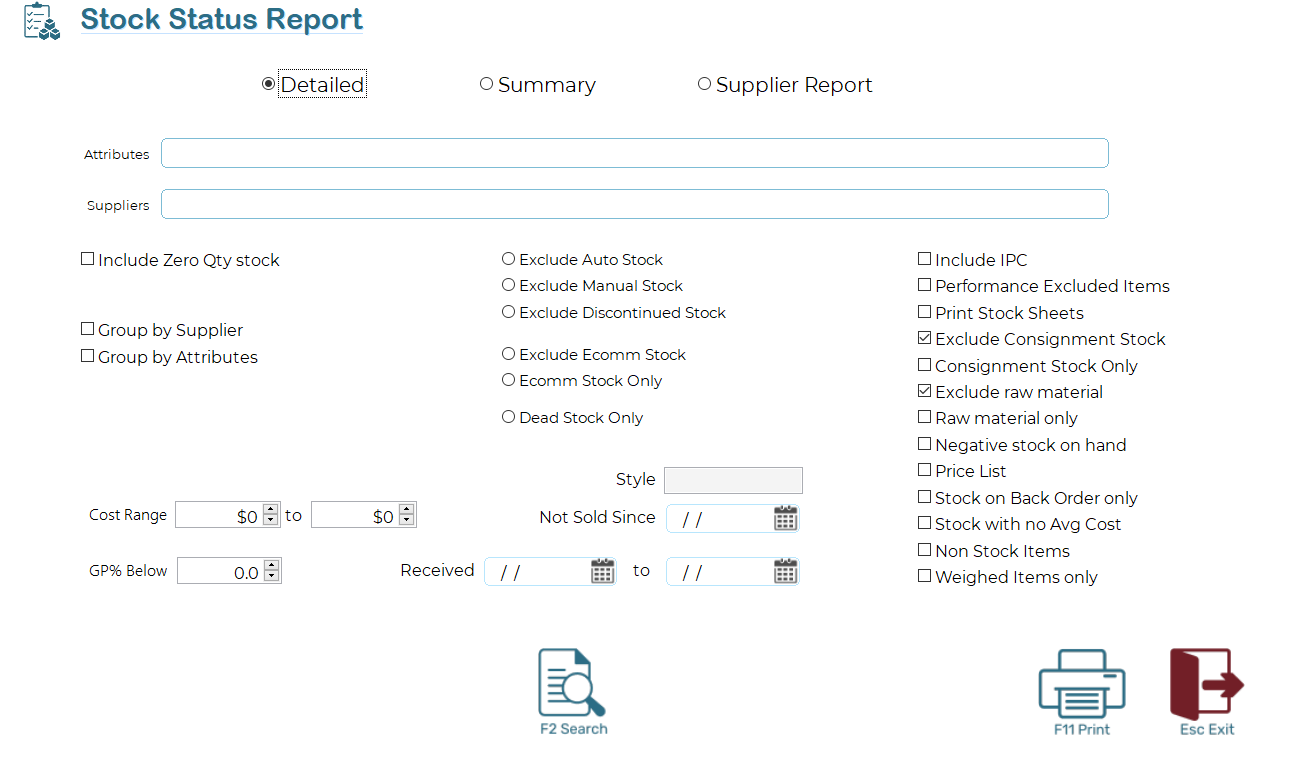
This report can be run in Detailed, Summary, or Supplier Report mode and includes extensive filtering options to ensure only relevant stock is included.
Report Type
Select one of the following options at the top of the screen:
- Detailed
Displays individual stock items with full detail. This is the most commonly used option for analysis and troubleshooting.
- Summary
Provides a condensed, high-level overview without individual item detail.
- Supplier Report
Groups and reports stock by supplier, ideal for supplier reviews and purchasing decisions.
Filters and Selection Criteria
- Attributes
Limits the report to stock items matching the selected attribute tags. Multiple attributes may be entered.
- Suppliers
Restricts the report to stock supplied by the selected supplier(s).
Stock Inclusion Options
Include Zero Qty Stock
Includes items with zero stock on hand.
Group by Supplier
Groups the output by supplier.
Group by Attributes
Groups the output by stock attributes.
Stock Type Filters
These options control which types of stock are included or excluded:
Exclude Auto Stock
Exclude Manual Stock
Exclude Discontinued Stock
Ramsys classifies stock as Auto, Manual, or Discontinued. Any stock not set to Auto is considered Off-Range.
E‑Commerce and Dead Stock Filters
Exclude Ecomm Stock
Removes eCommerce-enabled items from the report.
Ecomm Stock Only
Includes only eCommerce-enabled items.
Dead Stock Only
Lists items classified as Dead Stock. Dead Stock is defined as items that have not sold within the system-defined time period (default: 180 days, configurable in System Options).
Cost and Margin Filters
Cost Range
Filters items based on cost value (From / To).
GP% Below
Includes only items with a gross profit percentage below the specified value.
Date Filters
Not Sold Since
Includes items that have not been sold since the specified date.
Received (From / To)
Limits the report to items received within the selected date range.
Additional Options
Include IPC
Includes IPC (international Bar-coded items).
Performance Excluded Items
Includes items excluded from performance reporting.
Print Stock Sheets
Prints stock sheets for the listed items.
Exclude Consignment Stock
Removes consignment stock from the report.
Consignment Stock Only
Includes only consignment stock.
Exclude Raw Material
Removes raw material items.
Raw Material Only
Includes only raw material items.
Negative Stock on Hand
Lists items with negative stock quantities.
Price List
Outputs the report in price list format.
Stock on Back Order Only
Includes only items currently on back order.
Stock with No Avg Cost
Identifies items missing an average cost value.
Non Stock Items
Includes non-stock items.
Weighted Items Only
Includes items sold by weight.
Style
Allows filtering by stock style code where applicable.
Usage Tips
Use Dead Stock Only in combination with Not Sold Since to identify obsolete or slow-moving items.
Combine Exclude Auto Stock with supplier grouping to analyse off-range inventory.
Use Stock with No Avg Cost regularly to maintain data integrity and reporting accuracy.
This report is a key tool for inventory optimisation, range management, and stock valuation review.