Dashboard
Sales Overview Dashboard
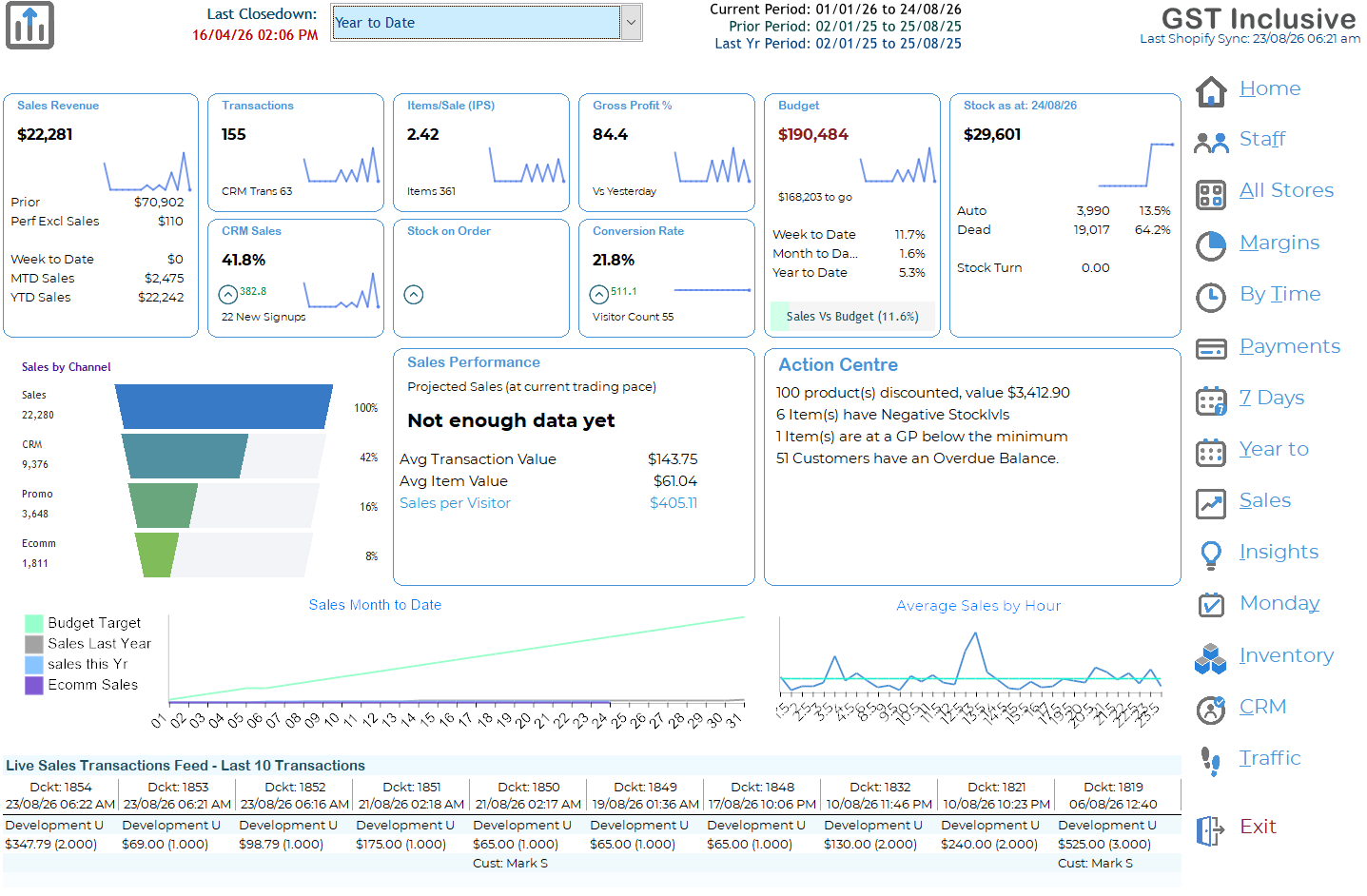
The Sales Overview Dashboard gives you an at-a-glance view of how the business is performing. It combines current sales, customer activity, stock, budgets and historical comparisons on a single screen.
The dashboard is designed to answer three simple questions:
How are we trading?
Why are we performing that way?
Is there anything that needs attention?
You do not need to understand every figure to benefit from the dashboard. Start with Sales Revenue, Transactions, Conversion Rate and Budget, then use the supporting information to understand what is driving the result.
Selecting the Period
Use the period selector at the top of the screen to choose the reporting period you want to review.
The dashboard shows the Current Period together with the equivalent Prior Period and Last Year Period where applicable. This makes comparisons meaningful even when calendar dates do not fall on exactly the same weekdays.
The Last Closedown date shows when the most recent POS close-down was completed. If this is not recent, some figures may not yet be fully up to date.
Key Sales Indicators
The cards across the top of the dashboard provide the most important retail KPIs.
Sales Revenue
Total sales for the selected period. Supporting figures provide comparisons such as prior sales, week-to-date, month-to-date and year-to-date performance.
Transactions
The number of completed sales transactions. This helps distinguish between increased sales caused by having more customers and increased sales caused by customers spending more.
Items/Sale (IPS)
The average number of items sold in each transaction. A higher IPS generally means customers are purchasing more items per visit.
Gross Profit %
The percentage of sales retained after the cost of the goods sold. Sales growth is useful, but it is important that it is not being achieved at the expense of margin.
Budget
Shows performance against the sales budget. Week-to-date, month-to-date and year-to-date percentages help identify whether the business is currently ahead of or behind target.
Stock
Shows the current value of stock together with useful stock indicators such as automatic replenishment stock, dead stock and stock turn. High stock levels do not necessarily mean healthy stock — pay particular attention to excessive dead or slow-moving stock.
Customer and CRM Performance
CRM Sales shows the proportion of sales associated with customers identified in your customer database.
New customer sign-ups are also displayed where available.
A healthy CRM percentage means more transactions can be associated with known customers, giving the business greater opportunity for loyalty programs, targeted marketing and repeat business.
Conversion Rate
Conversion Rate measures how effectively store visitors are being converted into purchasers.
For example, if 100 people enter the store and 25 make a purchase, the conversion rate is 25%.
Conversion is particularly useful when considered alongside sales and footfall. A busy store with disappointing sales may have a conversion problem, while strong sales during relatively quiet traffic may indicate very effective selling.
The Visitor Count shown beneath the KPI is the recorded store footfall.
Footfall data requires a compatible people-counting system. Where this information is supplied by an external service, the figures shown are dependent on the data received from that service.
Sales Performance
The Sales Performance panel turns the headline sales figures into measures that are easier to use on the shop floor.
Projected Sales estimates where today's sales may finish if the current trading pattern continues. Ramsys compares today's sales with historical trading patterns from comparable days.
Early in the trading day there may not be enough information to produce a meaningful projection. In this situation, Not enough data yet is displayed rather than presenting an unreliable forecast.
Projected Sales should always be treated as an indication rather than a guarantee. Customer traffic, large individual purchases, weather, promotions and other events can materially change the final result.
Average Transaction Value
The average dollar value of each completed transaction:
Sales ÷ Transactions
This helps answer: Are customers spending more or less each time they buy?
Average Item Value
The average selling value of the items being purchased:
Sales ÷ Items Sold
This helps distinguish between selling more products and selling higher-value products.
Sales per Visitor
The amount of sales revenue generated for every person entering the store:
Sales ÷ Footfall
Unlike Average Transaction Value, this includes visitors who did not purchase. It is therefore a particularly useful overall measure of how effectively customer traffic is being turned into revenue.
For example, $10,000 of sales from 500 visitors produces Sales per Visitor of $20.00.
Sales by Channel
The Sales by Channel funnel shows where sales are coming from.
Depending on your Ramsys configuration, channels may include normal retail sales, CRM/customer sales, promotional sales and ecommerce.
The percentages make it easy to see the relative contribution of each channel.
Use this information to understand the composition of your sales rather than simply concentrating on the total. For example, increasing promotional sales accompanied by falling gross profit may warrant investigation.
Action Centre
The Action Centre highlights situations that may require attention.
These can include:
- Products currently being sold at a discount
- Negative stock levels
- Items being sold below the required gross profit
- Customers with overdue balances
- 0 growth of CRM customers
The Action Centre is intended to draw attention to exceptions rather than requiring staff to search through reports.
A warning does not necessarily mean something is wrong. It means the item is worth reviewing.
Sales Month to Date
The Sales Month to Date graph shows how sales are progressing through the month.
Depending on the available information, the graph can compare:
Budget Target — where sales need to be to achieve budget.
Sales Last Year — sales performance for the equivalent period last year.
Sales This Year — actual sales for the current period.
Ecommerce Sales — the ecommerce component of sales.
This graph is useful for identifying whether the business is gaining or losing ground during the month rather than relying solely on the final month-to-date figure.
Average Sales by Hour
The Average Sales by Hour graph shows the normal sales pattern throughout the trading day.
It helps identify the busiest and quietest trading periods and can assist with decisions such as staffing, breaks and promotional activity.
Look for the pattern, rather than concentrating on an individual spike. A large transaction can temporarily make one period appear unusually strong.
Live Sales Transactions Feed
The bottom of the dashboard displays the most recent sales transactions.
This provides an immediate view of current trading activity, including information such as:
Docket number • Date and time • Operator • Sale value • Item quantity • Customer
The feed is particularly useful for managers monitoring trading without needing to open the detailed sales enquiry screen.
Using the Dashboard to Improve Sales
The greatest value comes from looking at several KPIs together rather than judging performance from one number.
For example, if Sales are down, check Footfall first. If fewer people entered the store, the sales decline may simply reflect lower customer traffic. If footfall is normal but Conversion is down, investigate why customers are entering but not purchasing.
If Transactions are healthy but Sales are down, look at Average Transaction Value, Average Item Value and IPS. Customers may still be buying, but purchasing fewer items or lower-value products.
If Sales are strong but Gross Profit % is falling, check promotional and discounted sales. Increasing revenue through excessive discounting may not represent improved performance.
If Sales per Visitor is improving, the store is generating more revenue from the traffic it receives. This can result from improved conversion, larger transactions, or both.
Important
No single KPI tells the whole story. IPS, Conversion, Average Transaction Value, Sales per Visitor and Gross Profit should be considered together.
The purpose of the dashboard is not simply to score store or staff performance. It is to help identify what is changing, understand why it is changing, and determine where action may improve the result.