Load Selections
Load Selections (Bulk Item Loading)
The Load Selections page is used when setting up a promotion to bulk-load qualifying stock items based on defined criteria. This allows promotions to be applied efficiently to large groups of items without selecting each item individually.
Use this screen to:
Select groups of items by supplier, brand, attributes, and retail price range
Optionally restrict the selection to dead stock
Apply a uniform discount calculation method
Load the resulting item set into the promotion in one action
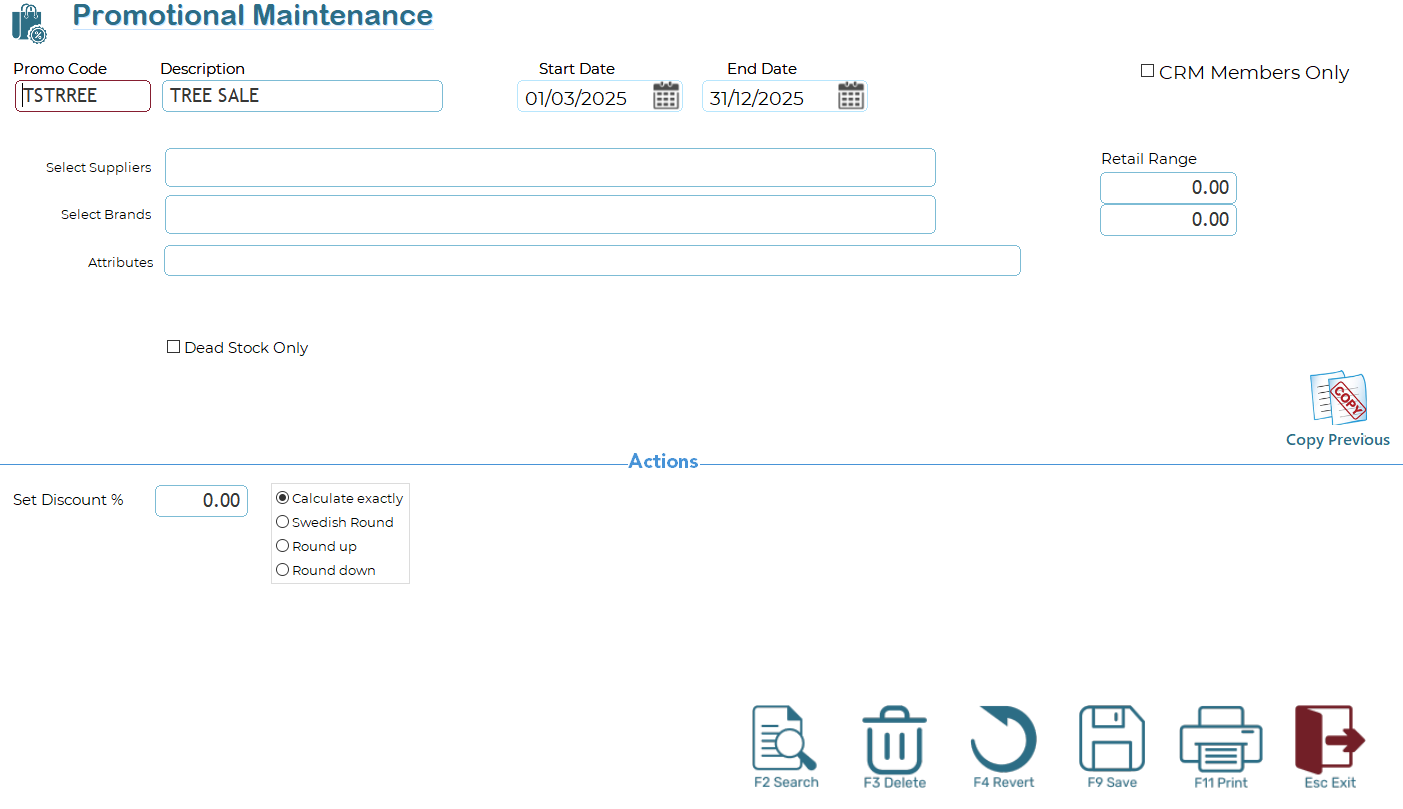
The fields at the top of the screen define which items will be loaded into the promotion.
- Select Suppliers - Enter or select one or more suppliers to restrict the promotion to items supplied by those suppliers only. Leave blank to include all suppliers.
- Select Brands - Enter or select one or more brands. Only items matching the selected brands will be included. Leave blank to include all brands.
- Attributes - Enter one or more attribute tags. Items must contain the specified attributes to qualify. Attributes are matched using the stock attribute tag system.
- Retail Range - Specify a minimum and maximum retail price.
- Items with a retail price within this range will be included
- Leave both values at 0.00 to ignore retail price filtering
- Dead Stock Only - When enabled, only items identified as dead stock will be loaded into the promotion. This is typically used for clearance or stock-reduction promotions.
Actions – Discount Setup
The Actions section controls how the discount is applied to the selected items.
- Set Discount % - Enter the percentage discount to be applied to all loaded items.
- Calculation Method - Choose how the discounted price is calculated:
- Calculate exactly - Applies the discount with no rounding adjustments. The resulting price is calculated precisely based on the discount percentage.
- Swedish Round - Applies the discount and then rounds the final price using Swedish rounding rules (commonly used where low-denomination coins are not in circulation).
- Round up - Applies the discount and rounds the final price up to the nearest rounding unit.
- Round down - Applies the discount and rounds the final price down to the nearest rounding unit.
The selected calculation method will be applied consistently to all items loaded through this screen.
Copy Previous
The Copy Previous option allows you to reuse the selection criteria and discount settings from the previous promotion load. This is useful when creating similar or recurring promotions.
Usage Notes
Leaving selection fields blank will broaden the item selection, empty filter fields will be ignored by the select.
All criteria are combined when loading items (items must meet all specified conditions)
Once loaded, items can still be reviewed or adjusted within the promotion before activation
This screen is designed to simplify and standardise bulk promotional setup while maintaining precise control over item selection and pricing behaviour.