Multibuys
Multi-buys (Mix & Match Promotions)
Buy X, Get Y at a Special Price
Ramsys supports Mix & Match promotions that let you offer deals such as:
Buy 2, Get 1 for $1
Buy 1, Get 1 Half Price
Buy 3, Get 2 Free (Get price = $0)
The system automatically works out how many items are sold at the normal price and how many qualify for the discounted price.
Multi-buy / Mix-match Codes Screen
This screen is used to set up Mix & Match (Multi-buy) promotions in Ramsys.
These promotions allow you to offer deals such as:
Buy 3 for $24.99
Buy 2, Get 1 for $6.99
Buy 1, Get 1 Free
Once created, these codes can be assigned to stock items so the POS will automatically calculate the correct full-price and discounted units during a sale.
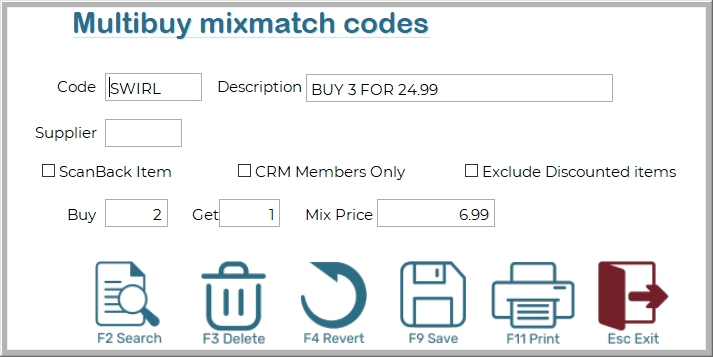
Code
A unique code for the promotion (e.g., SWIRL, B3G1).
This is an internal reference so you can identify the multi-buy rule.
Description
A short description of the offer.
Shown in reports and helps identify the deal.
Supplier
(Optional) Link the deal to a supplier.
Useful when promotions are vendor-funded or need reporting grouped by supplier.
ScanBack Item
Tick if this deal is part of a scan-back program where the supplier reimburses discount costs based on scanned sales.
CRM Members Only
When ticked, only CRM (loyalty/member) customers will receive this multibuy pricing.
Exclude Discounted Items
Prevents already-discounted items from being included in this multibuy offer.
Mix-match Settings
Buy - The number of items the customer must buy at the normal price.
Get - The number of items the customer receives at the Mix Price.
Mix Price - The special price applied to each Get item.
Examples:
$0.00 → Free item
$1.00 → “Buy 2, Get 1 for $1”
$6.99 → “Buy 2, Get 1 for $6.99”
Together, these three fields define the actual promotion.
How Ramsys Handles Multi-buys
When an item with a multi-buy promotion is sold, Ramsys:
Adds up all quantities of the same item in the sale (even if they appear on multiple lines).
Figures out how many full deals apply
(e.g., for “Buy 2, Get 1”, a deal uses 3 items).
Works out how many items do not fit into a deal
These are charged at the normal price.
Splits the sale into two lines:
A normal-price line
A discount-price line
Displays both lines in the POS so the pricing is clear and accurate.
Example
Promotion:
Buy 2, Get 1 for $1.00
Customer Buys:
5 units
How Ramsys Calculates It:
1 full deal uses 3 items
2 items are left over
Result:
4 items at normal price (2 from the deal + 2 leftover)
1 item at the discount price ($1.00) Ramsys automatically shows these as two lines on the POS.
If No Deal Applies
If the customer buys fewer items than required for the promotion, Ramsys simply charges all items at the normal price.
There is nothing you need to do — the system handles this automatically.
Important Notes
Multibuys always use whole item quantities — no rounding or partial deals.
If multiple lines of the same item are in the sale, Ramsys combines them before calculating the deal.
The POS screen will always show clear, separate lines for full-price and discounted items.
Why Ramsys Does This
This method ensures:
- Promotions are always calculated correctly
- Customers clearly see the normal and discounted items
- Totals match receipts, reports, and stock records