Sales People
Salesperson Maintenance
The SalesPerson Maintenance screen is used to add, update, and manage salesperson records within the system. Each salesperson can be assigned a code, login credentials, occupation details, and security level
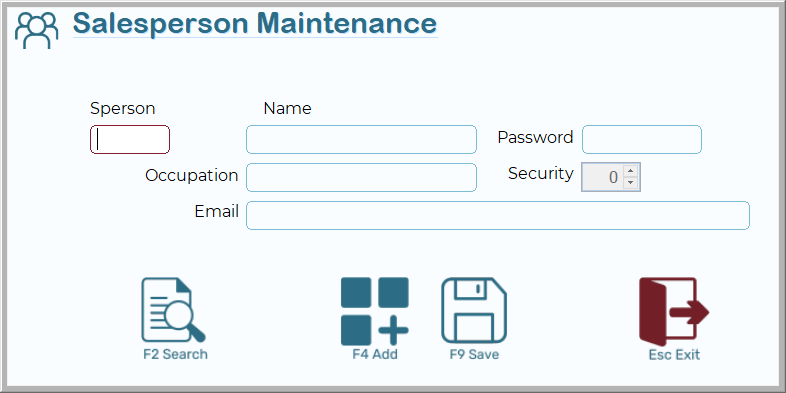
Screen Overview
- Sperson
A unique code identifying the salesperson. This is a required field. - Name
The full name of the salesperson. - Password
The login password for the salesperson. This will be required if you allocate a security level 4 or above. - Occupation
The role or job title of the salesperson. - Security
A numeric level controlling the user’s access rights in the system. Higher values typically grant greater access. as a rule, 3 for sales staff, 5 for stock controllers, 6 for a manager. - Email
The salesperson’s email address. This may be used for system notifications, customer communications, or reporting.
Function Keys and Buttons
- F2 Search 🔍
Opens the search window to locate an existing salesperson record. - F4 Add ➕
Creates a new salesperson record. - F9 Save 💾
Saves the current record. - Esc Exit ⬅️
Exits the Salesperson Maintenance screen.
Usage Notes
- Always ensure the Sperson code is unique. Duplicate codes will not be accepted.
- Assign an appropriate Security level to control system access.
- Click F9 Save after making any changes to ensure data is recorded.
- Use F2 Search before adding a new salesperson to confirm they do not already exist in the system.