Promotions Calendar
Promotions Calendar
The Promotions Calendar provides a visual, month-by-month view of all promotional activity across the system. It allows users to quickly see when promotions start and finish, what promotions are currently active, identify overlaps, and drill into promotion details.
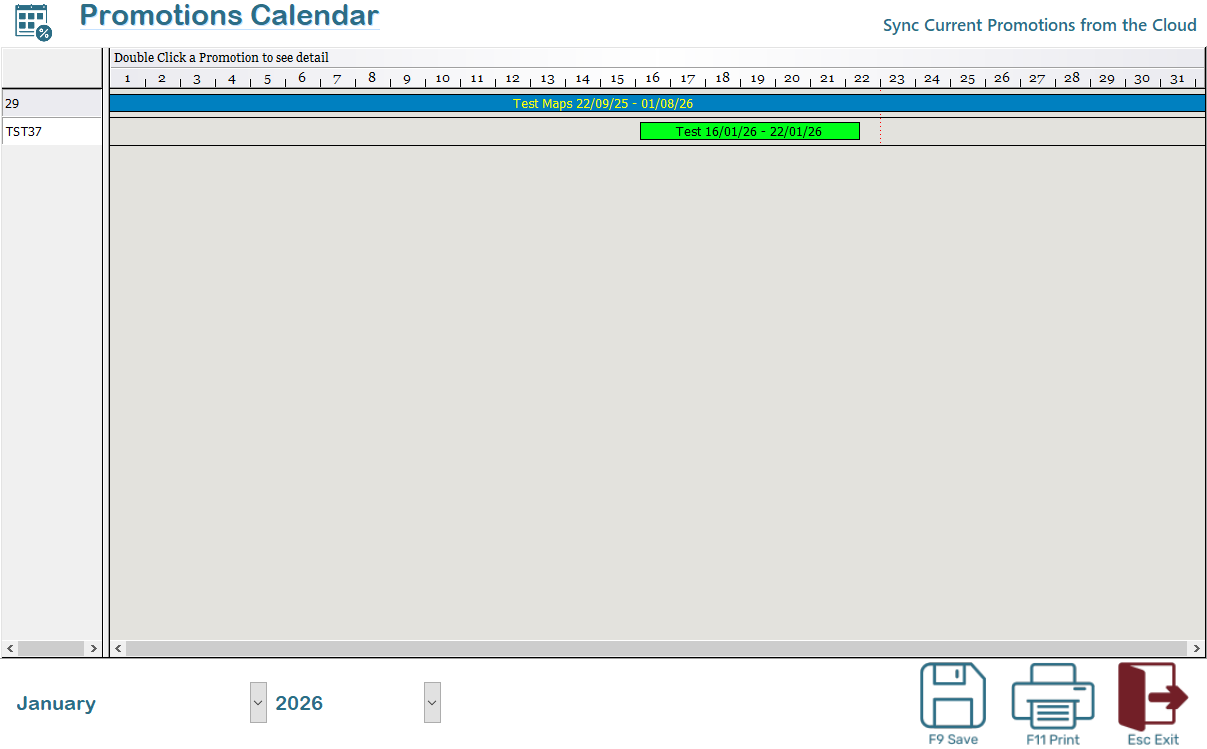
The Promotions Calendar is designed to:
- Display all promotions for a selected month and year
- Provide a clear timeline view of promotion durations
- Allow quick access to promotion details
- Assist with planning, validation, and conflict checking of promotions
Calendar Header
- The calendar displays the selected month and year across the top.
- Each column represents a day of the month.
- Day numbers are shown sequentially from left to right.
Promotion Rows
- Each horizontal bar represents a single promotion.
- The bar spans from the promotion start date to end date.
- The promotion name and date range are displayed inside the bar.
Colouring may be used to visually differentiate promotions or highlight status.
Navigation and Controls
Month and Year Selection
At the bottom of the screen:
- Use the Month selector to change the displayed month.
- Use the Year selector to change the displayed year.
The calendar refreshes automatically to show promotions applicable to the selected period. When first opened the current month and year are the default
User Actions
View Promotion Details
- Double-click on a promotion bar to open the promotion details screen.
- From there, you can review or print the promotion configuration.
Sync Current Promotions from the Cloud (enterprise only)
- Use Sync Current Promotions from the Cloud to refresh the calendar using the latest promotion data.
- This ensures the calendar reflects current promotions configured centrally or in connected systems.
Typical Use Cases
- Confirm which promotions are active in a specific month
- Identify overlapping or conflicting promotions
- Validate promotion timing before launching campaigns
- Quickly access and review promotion details
Notes
- Only promotions that overlap the selected month are displayed.
- Promotions spanning multiple months will appear across each applicable month when viewed.