Re-Extract Integrations
Ramsys POS – Manual Re-Extract Options
All Ramsys integrations are automatic and inherently reliable, designed to keep your systems, databases, and external services in sync without user intervention. However, as with any complex system, there are always factors beyond our control, such as internet connectivity, third-party APIs, and their operational limits that may occasionally disrupt normal synchronisation.
The Re-Extract Options popup Found on the Help/About Page on the main Menu provides quick access to common system extraction and synchronisation tasks. These actions are typically used to update external integrations, databases, and communication tools manually, when needed.
This popup is designed for efficiency, allowing you to trigger these operations without navigating multiple screens, making it simple to correct or refresh data when something goes wrong.
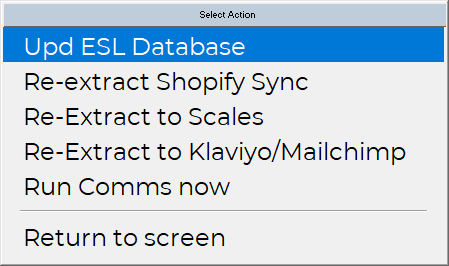
1. Upload ESL Database
- Purpose: Updates the ESL (Wedderburn Electronic Shelf Label) database with the latest product and pricing information.
- When to Use:
- After modifying stock details, pricing, or promotions this data will be sent to the label automatically.
- When ESL displays are not reflecting the latest data.
- Effect: Pushes current database records to the ESL system.
2. Re-extract Shopify Sync
- Purpose: Forces a manual synchronisation between Ramsys and your Shopify store for all items changed on or after a set date.
- When to Use:
- If automatic sync fails or is delayed.
- When inventory changes have not for any reason not pushed through automatically.
- Effect: Updates product inventory levels.
3. Re-Extract to Scales
- Purpose: Sends product and pricing information to connected Wedderburn scales running Atria Lite for 020 barcode creation.
- When to Use:
- After changing product prices, descriptions, or weight-based products if the automatic update was unable to connect.
- When scales are not displaying the latest data.
- Effect: Ensures that all scales reflect the current product catalogue and pricing accurately.
4. Re-Extract to Klaviyo/Mailchimp
Note: This option is only available if the relevant integration is enabled.
- Purpose: Updates your email marketing platforms (Klaviyo or Mailchimp) with the latest customer and product information for all customers changed on or after a set date.
- When to Use:
- After updating customer records or sales data if the automatic update was unable to connect.
- When new products or campaigns need to be reflected in email marketing lists.
- Effect: Synchronises Ramsys customer and product data to your selected email platform.
5. Run Comms Now (Enterprise version Only)
- Purpose: Immediately triggers communications to the Ramsys Central cloud database.
- When to Use:
- When urgent communications must be sent.
- Effect: Executes all pending communication tasks without waiting for scheduled intervals.
6. Return to Screen
- Purpose: Closes the popup and returns to the previous screen.
- Effect: No actions are executed; simply exits the popup.
Usage Tips
- Always ensure data is saved before initiating any extraction.
- Re-extract tasks may take a few seconds to complete, depending on the integration and volume of data.
- Only trigger Re-Extract to Klaviyo/Mailchimp if these integrations are active; otherwise, the option will be skipped.
- Use these functions sparingly to avoid overloading 3rd party communication queues.