Adding Variants
Adding Variants
(Premium POS Only)
Create Multiple Stock Items (Variants)
The Create Multiple Stock Items screen allows you to quickly generate several related stock items in one step. This is commonly used when a product exists in multiple sizes, colours, or other variations. Instead of creating each item individually, Ramsys lets you enter the details and build multiple variants efficiently.
Styles and Variants
In retail, a style refers to the core product (for example Animal Swirl Dress), while variants are the individual sellable versions of that product. Variants typically differ by attributes such as:
- Size (e.g., SML, REG, LGE)
- Colour (e.g., BBI, BLK, TOA)
- Age or fit (e.g., 4YR)
Each variant becomes its own stock item with a unique ISC Code, and can have its own barcode, cost, and retail price, while still belonging to the same style.
This screen simplifies the creation of those variants.
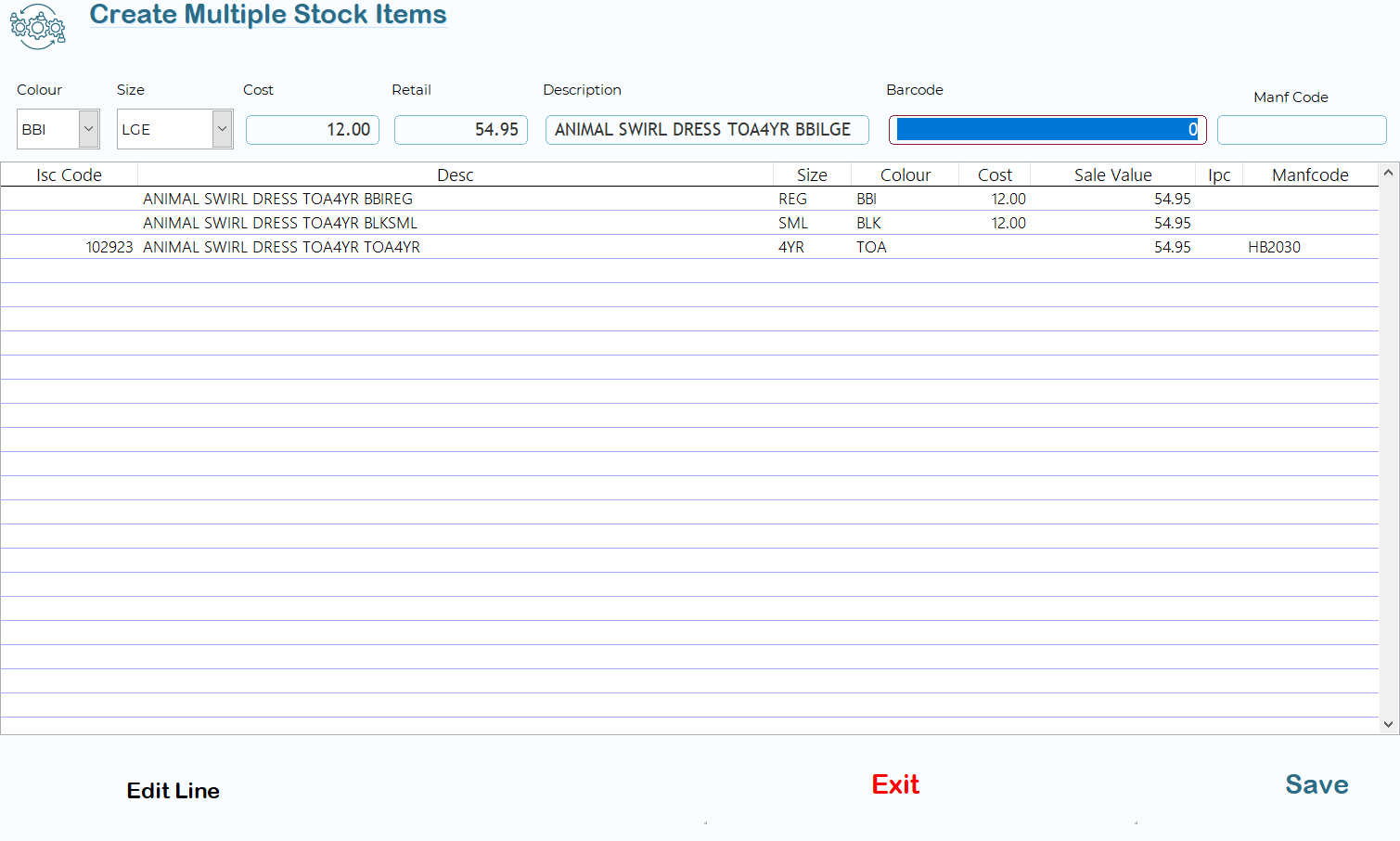
Top Entry Fields
These fields define the details of the variant you want to add.
Colour
Select the colour code for the item. Colour codes help identify variants and are typically short codes such as BBI, BLK, etc.
Size
Select the size or variant identifier (e.g., SML, REG, LGE, 4YR).
Cost
Enter the purchase cost for the item.
Retail
Enter the retail selling price.
Description
The product description. This normally contains the style name followed by the variant information.
Barcode
Enter or scan the barcode if available. Each variant can have its own barcode.
Manf Code
Manufacturer or supplier product code if supplied.
After entering the details, the item will be added to the list below.
Variant List Grid
The large grid shows all variants that will be created.
Columns include:
|
Column |
Description |
|
Isc Code |
The unique Ramsys stock code generated for the item |
|
Desc |
Full item description |
|
Size |
Size variant |
|
Colour |
Colour variant |
|
Cost |
Purchase cost |
|
Sale Value |
Retail selling price |
|
IPC |
Supplier or internal product code |
|
Manfcode |
Manufacturer code |
This grid allows you to review all items before they are saved to the stock system.
Editing a Variant
Edit Line
Select a line in the grid and choose Edit Line to modify the details for that variant.
Saving the Variants
Save
Creates all listed variants as new stock items in Ramsys.
Exit
Closes the screen without saving.
Typical Workflow
- Enter the Colour and Size of the variant.
- Confirm the Cost and Retail price.
- Enter or scan the Barcode if required.
- Confirm the Description and optional Manufacturer Code.
- Repeat for additional variants.
- Review the list in the grid.
- Click Save to create all items.
Example
A single dress style might generate multiple variants such as:
- Animal Swirl Dress – REG / BBI
- Animal Swirl Dress – SML / BLK
- Animal Swirl Dress – 4YR / TOA
Each variant becomes a separate stock item but still belongs to the same style for reporting and stock management.