Collect and Redeem Rewards
Standard Operating Procedure (SOP) for processing Customer Rewards and Vouchers.
Why does Ramsys use vouchers?
Ramsys can be configured to reward loyal customers. For example, a customer who spends $300 may automatically receive a $10 reward voucher. Both the spend threshold and reward amount are fully configurable.
Unlike many retail systems, Ramsys records every reward as a Voucher. This is important because reward vouchers are considered a legal financial liability until they are redeemed or expire. Recording rewards this way provides:
- Complete financial accountability.
- Accurate liability reporting.
- Full audit history.
- The ability to expire or cancel vouchers.
- Individual voucher tracking.
- Compliance with accounting and tax requirements.
A reward voucher may be:
- Printed for the customer.
- Emailed to the customer.
- Stored electronically only.
Regardless of how it is delivered, it is always stored securely within Ramsys.
Earning Rewards
There is nothing special staff need to do. Simply process the sale as you normally would.
During the sale Ramsys automatically:
- Calculates the customer's qualifying spend.
- Updates their reward balance.
- Issues any reward vouchers they have earned.
- Stores the voucher electronically.
- Displays their progress towards the next reward.
No manual calculations are required.
CRM Member Verification Screen
When a CRM member is selected, the verification screen displays all reward information at a glance.
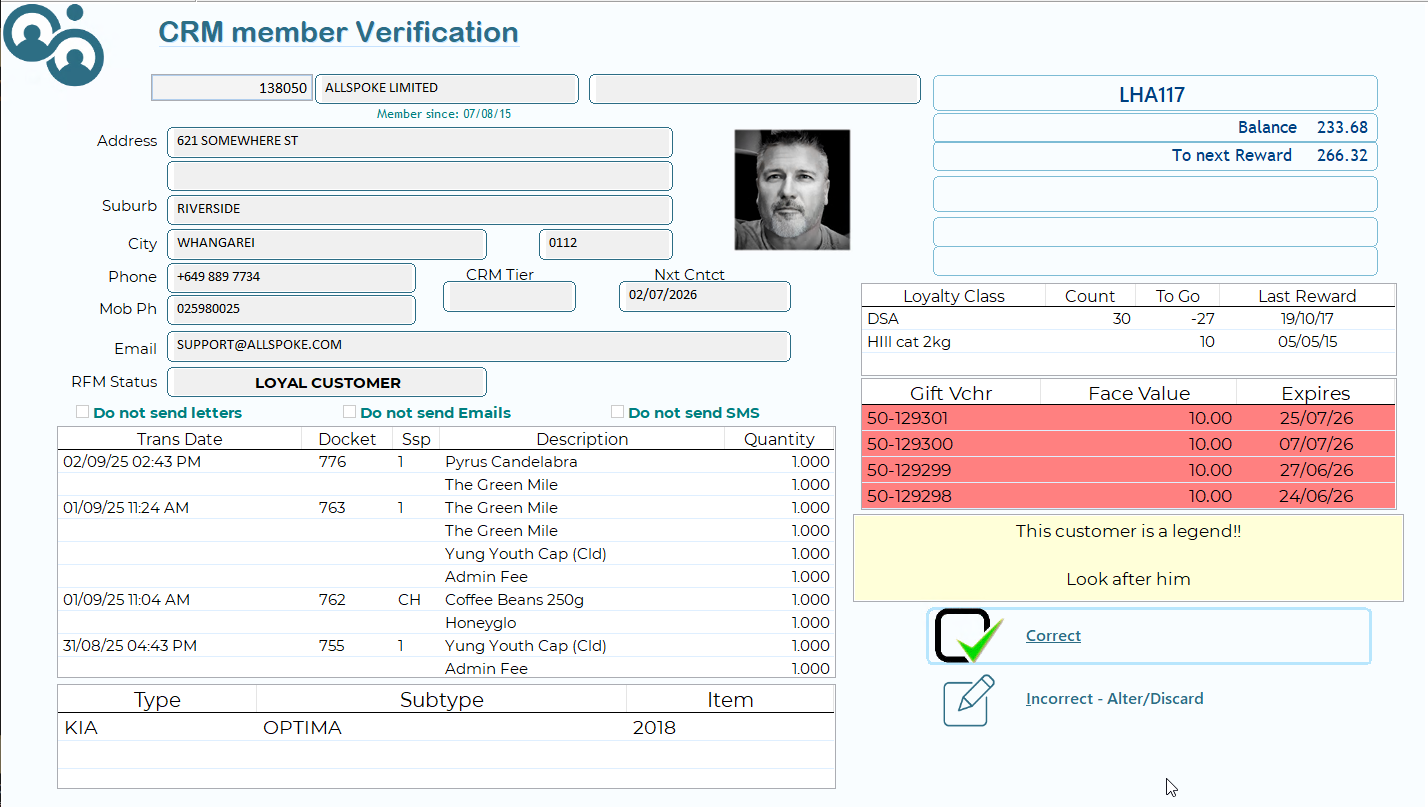
The screen shows:
- Current reward balance.
- Amount still required to earn the next reward.
- Any reward vouchers currently available.
- Voucher expiry dates.
Redeeming Reward Vouchers
Reward vouchers are redeemed using the Voucher payment type.
At the usual sale payment screen:
- Select Voucher as the payment method.
- Ramsys will automatically suggest the oldest valid voucher.
- Press OK to accept it or enter another voucher number if required.
- Repeat if multiple vouchers are being used.
- Complete the remaining balance using any other payment method.
For example:
Sale Total: $200.00
Payment could be:
- Voucher $10
- Voucher $10
- EFTPOS $180
Ramsys automatically validates every voucher and updates the customer's balance.
Multiple Vouchers
Customers can redeem:
- One voucher
- Several vouchers
- No vouchers at all
Unused vouchers simply remain on the customer's account until they are redeemed or expire.
Voucher Expiry
Reward vouchers may be configured with an expiry date. Ensure your expiry policy complies with the laws in your region. If you are unsure, seek advice from your Ramsys reseller, accountant, or legal adviser before enabling voucher expiry, as these laws are often strictly enforced.
Your business can choose how Ramsys handles expired vouchers.
Option 1 – Warning (Recommended)
If a voucher has expired, Ramsys displays a warning but allows staff to decide whether to accept it. This provides excellent customer service.
For example:
A loyal customer whose $5 voucher expired yesterday probably shouldn't be turned away.
Most retailers choose this option.
Option 2 – Reject
Expired vouchers are automatically declined and cannot be redeemed.
Printing or Emailing Vouchers
Reward vouchers can be configured to:
- Print automatically.
- Be emailed automatically.
- Be stored electronically only.
Even if no paper voucher is issued, the voucher is still securely stored within Ramsys and will be offered automatically when the customer shops again.
Customers cannot lose their rewards simply because they misplaced the paper voucher.
What Staff Need to Remember
Processing reward customers is simple.
✔ Sell items as normal.
✔ Watch the CRM Verification screen for reward information.
✔ If the customer wishes to redeem rewards, select Voucher as the payment type.
✔ Ramsys automatically suggests the oldest valid voucher.
✔ Complete the remaining payment using any normal payment method.
That's it.
Ramsys automatically manages:
- Reward balances.
- Voucher creation.
- Voucher validation.
- Expiry checking.
- Liability tracking.
- Financial reporting.
- Audit history.
Staff do not need to calculate points, remember balances, or keep track of reward vouchers. Ramsys does it all automatically, ensuring both a smooth customer experience and accurate financial records.